Affiliate links are used below. Our score is set before any commercial relationship is considered.
Tenorshare iCareFone is an iOS device manager for Windows and macOS: backup, selective restore, file transfer, photo compression, and a set of repair-adjacent tools. It is included in this comparison because people search for it while migrating phones, not because it is a migration tool.
The distinction matters. iCareFone manages one iPhone well. It does not move data from an Android phone, and it does not clone one iPhone to another in the way a transfer utility does.
Documentation, plus the vendor's own limits
Documentation-based: we have not run iCareFone on our bench. Its iOS backup and restore behaviour is well documented by the vendor, and the trial version allows a partial check before purchase. For measured transfer results on tools we did run, see the test log.
An iOS utility, not a migration tool
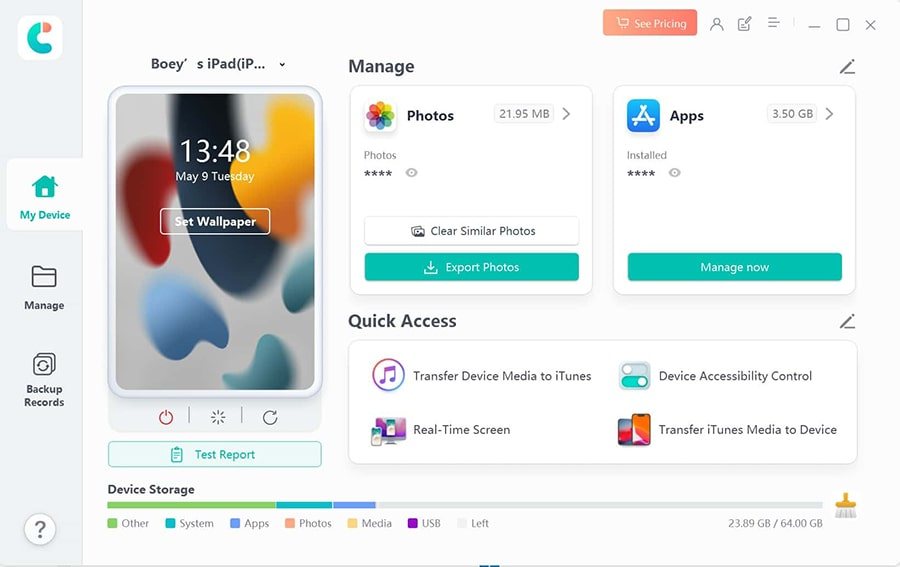
A desktop manager for iOS devices. The core loop is: connect an iPhone, browse categories in a sidebar, then back up, export or restore selectively. Selective restore is the feature that separates it from iTunes/Finder — you can pull one app's data or one photo album out of a backup without restoring the whole device.
The 2026 build also bundles one-click "repair operating system" style utilities, which is where the vendor's marketing energy goes. They are unrelated to migration.
The narrow transfer role
| Direction | Status |
|---|---|
| iPhone → computer | Yes, by category |
| iPhone → iPhone | Selective restore via backup |
| Android → iPhone | No |
| iPhone → Android | No |
| Android → Android | No |
| WhatsApp, cross-platform | Separate product (iCareFone Transfer) |
If your migration crosses platforms, this is the wrong purchase. That is a scope statement, not a criticism: the tool is honest about being an iOS manager.
Setup inside the iOS manager
USB, a trust prompt, a sidebar. On newer macOS versions you must allow the helper full-disk access before the device will mount. On Windows, install the Apple Mobile Device driver if iTunes is not present — missing drivers are the most common first-run failure.
Backups are local unless you point the tool at an iCloud account. Note that a local backup taken by iCareFone is not interchangeable with a Finder backup for restoring a device; keep a real iTunes/Finder backup before major changes.
$59.95 lifetime, chat sold apart
| Licence | Price | Scope |
|---|---|---|
| Monthly | $29.95 | 1 PC |
| One year | $49.95 | 1 PC |
| Lifetime | $59.95 | 1 PC |
| iCareFone Transfer | from $19.95/mo, $39.95/yr | 1 PC, 5 mobile devices |
Regional pricing applies and the store runs frequent discounts. The refund window is 7 days. Two separate licences is the awkward part: the WhatsApp product is not included in the manager.
Buy it for backup and cleanup
- iPhone-only households that want selective restore rather than whole-device restores.
- People who need to shrink a photo library before an iCloud plan upgrade.
- Buyers who want a lifetime iOS manager at a mid-field price.
- Anyone extracting one app's data from a backup without a full restore.
Skip it if chat history is the point
- Android → iPhone or iPhone → Android movers. No cross-platform transfer.
- Anyone who needs WhatsApp included. Separate purchase.
- Buyers who want a true phone clone. Apple's Quick Start is free and does more.
- Android users. There is nothing here for you.
Where the chat licence bites
Device not recognised on Windows. Install the Apple Mobile Device driver, then reconnect. This is the single most common failure and it is not the app's fault.
Backup fails at 90%. Usually storage on the PC, not the phone. Check free disk space; iOS backups are roughly the size of used storage.
Restore overwrote newer data. Selective restore writes over existing categories. Take a fresh backup immediately before restoring anything, and restore messages last.
WhatsApp transfer asks for a second licence. Expected — iCareFone Transfer is a separate SKU. Buy it only after reading the WhatsApp tools page.
Mac cannot mount the phone after an iOS update. Reset location and privacy settings to clear stale pairing records, then re-trust.
Against AnyTrans and Dr.Fone
| iCareFone | AnyTrans | EaseUS MobiMover | |
|---|---|---|---|
| Score | 7.6 | 7.8 | 7.2 |
| Focus | iOS management + selective restore | iOS management + iCloud | iOS file transfer |
| Lifetime price | $59.95 | Subscription | Free tier + paid |
| Android source | No | No | No |
| Separate licence | Limited extraction | No |
Against AnyTrans it is cheaper to own permanently and shallower on iCloud. Against MobiMover it is more capable and not free. None of the three is a cross-platform migration tool.
Two licences, one job
- No Android support of any kind.
- WhatsApp costs a second licence.
- Bundled repair features pad the product.
- 7-day refund window.
- Local backups are not interchangeable with Finder backups.
Verdict
A good iOS manager at a fair lifetime price, sold into a category where most buyers need cross-platform migration. If your world is Apple-only and you want selective control over backups, it is worth the $59.95. If you are switching platforms, keep reading the ranking.
7.6/10 — competent iOS tooling, wrong category for most searches.
FAQ
Can iCareFone move data from Android to iPhone?
No. It reads iOS devices only. Use a cross-platform tool for that migration.
Does the lifetime licence include WhatsApp transfer?
No. iCareFone Transfer is licensed separately.
Is the trial enough to test a restore?
It allows limited operations. Verify device compatibility, then buy before relying on it for a real restore.