Affiliate links are used below. Our score is set before any commercial relationship is considered.
AnyTrans is an iPhone, iPad and iPod content manager for Windows and macOS. It moves data between an iOS device, a computer, iTunes or Finder, iCloud, and — in a limited way — an Android phone. Comparing it with the rest of this category is misleading: most tools here are migration utilities, AnyTrans is a management suite that happens to include migration.
If your mental model is "copy my old iPhone to my new iPhone and fix my iCloud mess", it is the right product. If it is "move my Android phone to an iPhone", it is the wrong one.
Documentation only, and why
Documentation-based: we have not run AnyTrans on our bench. The feature depth is well documented and the trial version lets you verify device compatibility before buying, which is more than several rivals offer. For measured results on other tools, see the test log.
An iPhone manager with a transfer-shaped hole
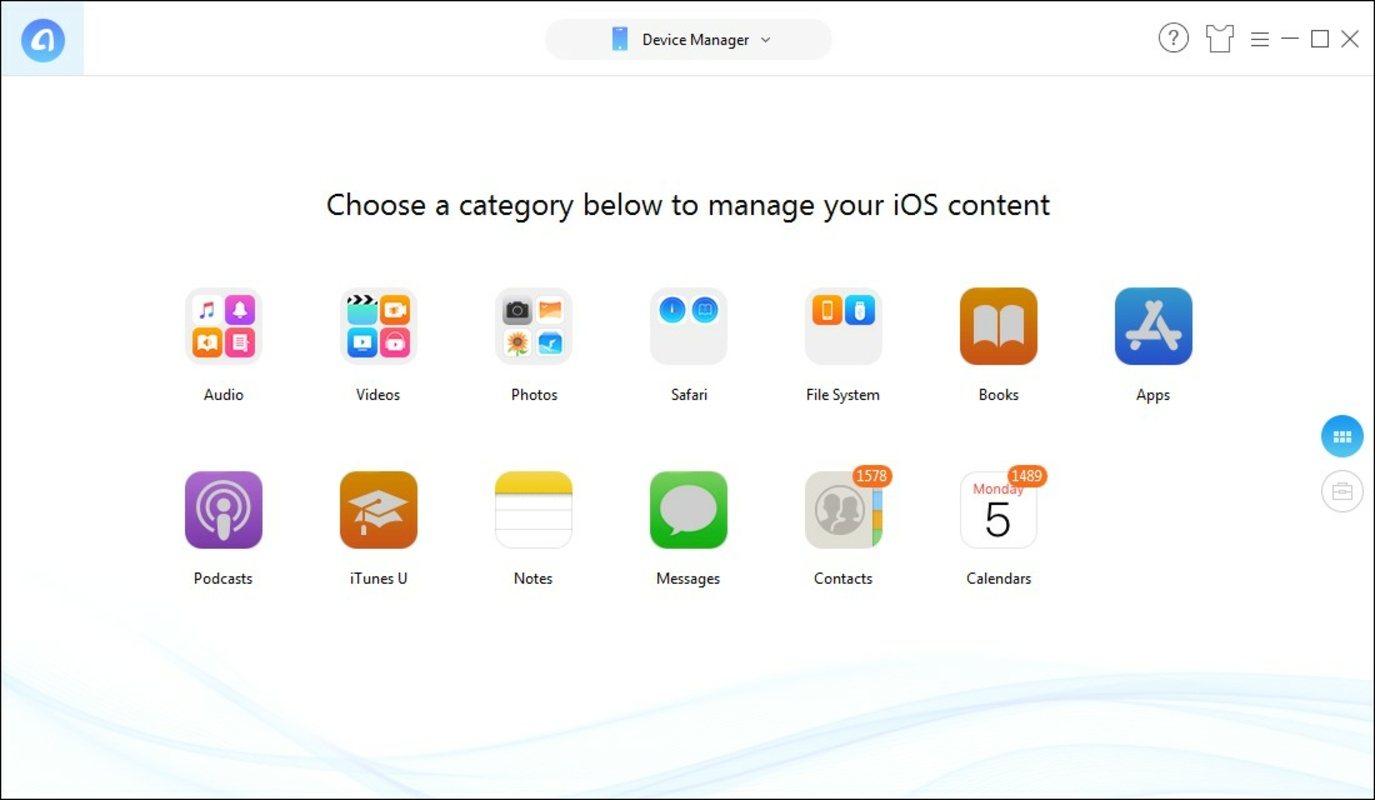
A device manager. The sidebar lists content types — photos, music, messages, contacts, calendars, books, app documents — and you browse, select, then export or import. There is no central "start copy" button, which is the single biggest difference from the transfer-only tools.
The iCloud side is the unusual part: you can browse an iCloud backup without restoring it, and pull a single album or a message thread out of it. For anyone who has paid for 2 TB of iCloud and cannot find what they need inside it, that is a genuinely useful capability.
Why nothing crosses from Android
| Capability | Status |
|---|---|
| iPhone → iPhone, by category | Yes |
| iPhone → computer | Yes, all content types |
| iCloud content browsing and extraction | Yes |
| iPhone → Android | Partial |
| Android → iPhone | No |
| Android → Android | No |
| Incremental and scheduled backups | Yes |
No Android source support at all is the fact that decides most buying conversations. This is an iOS tool, and it does not pretend otherwise — but people search for "phone transfer" and land here anyway.
Setup: where iTunes still decides
USB connection, a device trust prompt, then a sidebar. On macOS with recent iOS versions, local network and full-disk access permissions may be requested — approve them, or the device will not mount.
For a straight iPhone-to-iPhone move, Apple's Quick Start is faster and free. AnyTrans earns its keep when you want to be selective — messages and photos but not settings — or when iCloud storage is the obstacle rather than the tool.
Licence tiers and the renewal trap
A free trial transfers a capped number of items per category, enough to confirm compatibility but not to finish a migration. The paid licence removes the cap.
iMobie regionalises pricing and runs frequent promotions, so any single number here would be wrong within weeks. Expect a per-year licence in the same band as the transfer tools, plus a multi-device tier. Check the vendor's store page rather than a coupon site.
Buy it if you live inside iOS
- iPhone-only households that want real control over iCloud content and backups.
- People stuck behind iCloud storage limits, who need to extract content from a backup rather than restore it.
- Selective movers who want photos and messages without cloning settings.
- Anyone who manages several Apple devices and needs incremental backups.
Skip it if you are leaving iOS
- Anyone moving from Android. No Android source support, full stop.
- iPhone → Android switchers. The support there is narrow; a dedicated cross-platform tool does it better.
- One-off movers. For a single iPhone-to-iPhone transfer, Quick Start is free. See the iPhone to iPhone guide first.
- Buyers who want a lifetime licence. This is subscription-shaped pricing.
Known failure points
Device not recognised after an iOS update. Apple periodically changes the pairing trust model. Unlock the phone, tap Trust, and if it still fails, reset the location and privacy settings — that clears stale pairing records.
iCloud sign-in loops. Two-factor prompts tied to a different Apple Account are the usual cause. Sign out of the account in Settings, not just in the app.
Trial cap hit mid-migration. The cap is per category, so a large photo library stops early. Either buy, or split the export into batches.
Restored content duplicates. If you restored from iCloud and imported by category, the same photos exist twice. Delete one source and re-import once.
Against iCareFone and Dr.Fone
| AnyTrans | Coolmuster | EaseUS MobiMover | |
|---|---|---|---|
| Score | 7.8 | 9.1 | 7.2 |
| Focus | iOS management | Four-direction transfer | iOS file transfer |
| Android source | No | Yes | No |
| iCloud browsing | Yes | No | No |
| Price shape | Annual | $25.95/yr or $35.95 lifetime | Free tier + paid |
Against Coolmuster, AnyTrans is deeper inside Apple's ecosystem and useless outside it. Against MobiMover, it is more capable and more expensive. Neither is a cross-platform migration tool.
What it cannot do
- No Android source support.
- iPhone → Android is narrow, not a substitute for a transfer tool.
- Subscription pricing for a task most people repeat every two or three years.
- Feature sprawl slows the simple job down.
- Trial caps prevent a full trial run.
Verdict
A strong product with a misleading category position. If you live entirely inside Apple's ecosystem and want real control over backups and iCloud content, it is the best tool here. If you are crossing platforms, it cannot help you, and no amount of feature depth changes that.
7.8/10 — excellent iOS management, poor cross-platform migration.
FAQ
Can AnyTrans move WhatsApp from iPhone to Android?
Not as a supported migration. Some iOS backup extraction is possible, but writing a working Android chat database is outside its documented scope. Use the route in our WhatsApp guide instead.
Does it need iCloud?
No. Device-to-device and device-to-computer routes work without it; iCloud features are additive.
Is the trial enough to finish a migration?
No. It caps items per category, so it verifies compatibility rather than completing the job.