Affiliate links are used below. Our score is set before any commercial relationship is considered.
EaseUS MobiMover is an iOS-focused transfer tool for Windows and macOS. Its centre of gravity is moving files between an iPhone and a computer — photos, videos, music, contacts, messages — with a phone-to-phone mode added for iPhone-to-iPhone work.
It is included here because people search for it as a migration tool, and the honest answer is that it is only half of one.
What this review rests on
Documentation-based: we have not run MobiMover on our bench. The free tier is real and does not require a card, which is a point in its favour; the paid tier is what unlocks volume and the phone-to-phone modes. For measured comparisons of other tools, see the test log.
A file mover with an iOS accent
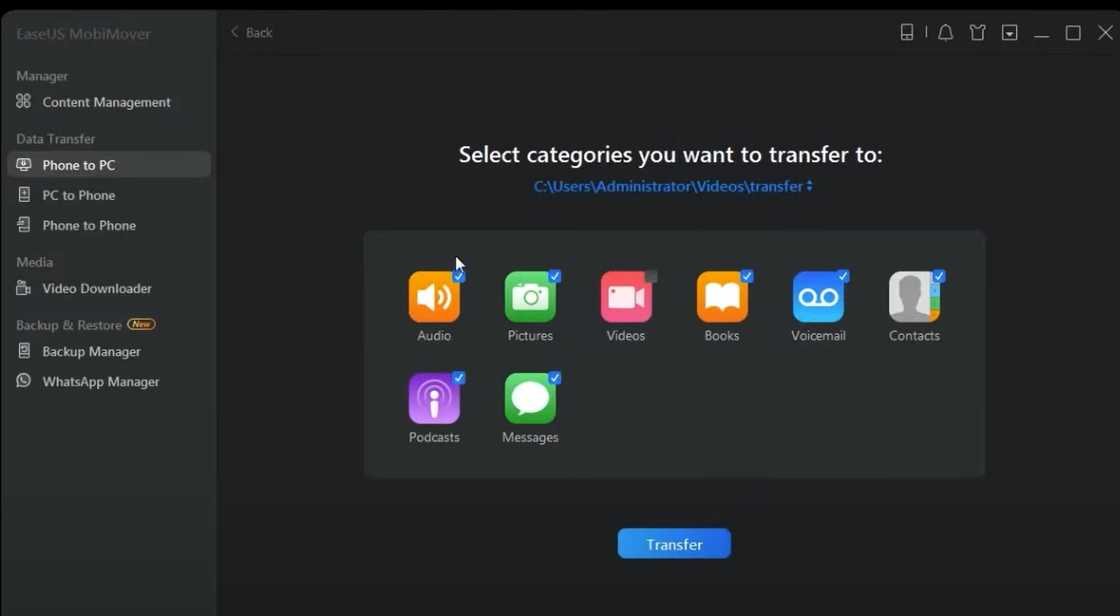
A file-transfer utility with a device browser. The sidebar lists categories, you select items, and the transfer button copies them to a computer or to another iOS device. There is no migration wizard, no guided clone, and no Android support anywhere in the product.
Why Android is missing
| Direction | Status |
|---|---|
| iPhone → iPhone | Supported |
| iPhone → computer | Supported — the main use case |
| iPhone → Android | Partial |
| Android → iPhone | No |
| Android → Android | No |
The free tier, honestly
There is a free version without a credit card, and it transfers a capped number of files per session. For someone who needs forty photos off a phone with a cracked screen, that is enough, and it is genuinely useful rather than a demo.
The cap is also the trap. On a full migration you hit it partway through, mid-category, and the only way forward is the paid upgrade prompt that appears at that moment. Decide before you start whether the free tier covers your volume.
Setup on a Windows PC
USB, a trust prompt, then a file-browser interface. Familiar to anyone who has used EaseUS software: sidebar of categories, checkbox selection, transfer button. On newer macOS versions you will need to grant full-disk access to the helper process, or the device will not mount.
Free, then $39.95 a year
A paid tier removes the file cap and adds the phone-to-phone modes. Pricing is regionalised and discounts are common; check the store page. There is also a bundle with EaseUS's data recovery products, which is usually poor value for a migration-only buyer.
Buy it if you only need iOS files
- Rescue missions: pulling photos and messages off a working iPhone before it is wiped or sold.
- Small, free transfers that fit inside the free tier.
- Existing EaseUS customers who already trust the interface.
Skip it if you own an Android phone
- Anyone migrating from Android. No Android source support at all.
- Full phone-to-phone clones. Use Apple's Quick Start — free, more complete, and it copies app data.
- Large photo libraries on the free tier. The cap will stop you mid-run.
- Buyers who dislike in-flow upsells.
Where the free tier stops
Free cap hit halfway. Nothing is corrupted, but the transfer stops. Either export in smaller category batches or buy the licence before starting.
iPhone not mounting on macOS. Grant full-disk access to the helper, then reconnect. This is the most common failure on recent macOS versions.
HEIC photos arrive as .heic. Convert after transfer, or use the tool's conversion option if your version has one. Some Windows image viewers cannot open HEIC.
Messages export as HTML or CSV. That is an export, not a migration: there is no way to import them back into iOS. Do not treat it as a backup.
Duplicates after phone-to-phone copy. The target is not wiped first, so imported contacts merge. Clean up in the contacts app.
Against the paid transfer tools
| EaseUS MobiMover | AnyTrans | Coolmuster | |
|---|---|---|---|
| Score | 7.2 | 7.8 | 9.1 |
| Free tier | Yes, capped | Trial, capped | Trial |
| Android source | No | No | Yes |
| iPhone → iPhone | Yes | Yes, by category | Contacts + calendars only |
| iCloud browsing | No | Yes | No |
Against AnyTrans it is cheaper and shallower. Against Coolmuster it is free at the entry point and far narrower in what it can do.
Narrow by design
- No Android support — disqualifying for half the searches that lead here.
- Free-tier caps are easy to hit mid-migration.
- No category-level verification or failure reporting.
- Upsell prompts inside the transfer flow.
- Not a backup tool, despite the name.
Verdict
Good at one job — getting files off an iPhone within the free cap — and not a serious candidate for a full phone migration. If you need to cross platforms, this is the wrong tool and the free tier will not change that.
7.2/10 — useful free utility, weak migration product.
FAQ
Can MobiMover move data from Android?
No. It reads iOS devices only.
Is the free version unlimited for photos?
No. There is a per-session cap, and it applies across categories.
Does it back up an iPhone?
It can copy content to a computer, but it is not a replacement for an iCloud or Finder backup. See the iPhone to iPhone guide for the real backup routes.
Which free tools actually migrate a phone?
Our free tools page covers the seven built-in routes and what each one cannot move.