Affiliate links are used below. Our score is set before any commercial relationship is considered.
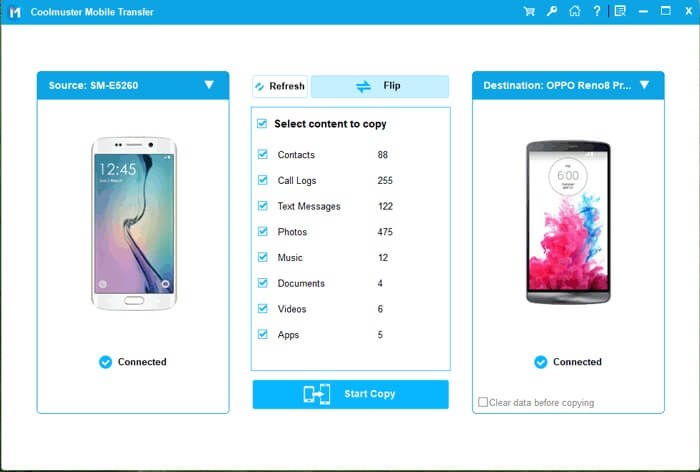
Coolmuster Mobile Transfer is a Windows and macOS application that copies data between two phones connected by USB. Four modes sit in one window — Android to Android, Android to iOS, iOS to Android and iOS to iOS — with no cloud step, no account, and a documented read-only relationship with the source device.
That combination is why it tops our ranking. It is not the widest tool on paper. It is the most predictable one for the money, and the one where the limits are stated before you pay rather than discovered afterwards.
What we have not run, stated plainly
We have not yet run Coolmuster on our bench, so this review is documentation-based: the coverage table above is what the vendor commits to, not what we measured. Our Windows test log shows what happens when coverage claims meet a real transfer — including one tool that lost 340 of 537 contacts while reporting success. Treat vendor claims, including these, as claims until a run confirms them.
The Android-to-iPhone restriction is unusually well documented by the vendor, which is itself a signal: tools that state their limits tend to have fewer of them in places you cannot see.
The four-direction baseline
A desktop utility, not a service. You install it, connect both phones, pick categories, press start. The vendor documents the app as running locally and in read-only mode against the source device, which means nothing is uploaded and nothing on the old phone is modified during the copy.
Supported systems are Windows 11 down to 7, plus macOS. Device support spans iPhone, iPad, iPod and Android phones from Samsung, Xiaomi, Redmi, POCO, TECNO, Infinix, itel and OPPO, among others — the vendor's wording is "all generations", which in practice means it does not refuse older hardware.
Coverage, direction by direction
| Direction | Documented data types |
|---|---|
| Android → Android | Contacts, SMS, call logs, photos, videos, music, eBooks, apps |
| Android → iPhone | Contacts and eBooks only |
| iPhone → Android | Contacts, SMS, photos, videos, music, eBooks |
| iPhone → iPhone | Contacts, calendars, bookmarks, eBooks |
Read the second row twice. If your migration is Android to iPhone and you need photos or messages, this is the wrong product — not because it is buggy, but because iOS gives third-party tools almost no write access beyond contacts, calendars and media. The limitation is the platform's; the problem is that it is easy to miss when the box says "phone to phone".
The iOS-to-iOS row is narrower than Apple's own Quick Start: no photos, no messages. It exists for people who want a selective move of contacts, calendars and bookmarks without touching iCloud storage. That is a real use case, and a niche one.
Two cables, four clicks
Three steps: connect both phones by USB, assign source and destination, tick categories and start. There is no decision tree and no wizard.
The friction is physical rather than conceptual. You need two data-capable cables — charge-only cables are the most common cause of "device not found" — a computer, and USB debugging enabled on the Android side. On macOS, recent versions ask for a one-time security approval for the system extension.
One behaviour worth planning for: the tool merges rather than overwrites. That is what you want when the new phone is already in use, but merging 3,000 contacts into an existing 800 produces duplicates. Clean them up with the contacts app's merge function afterwards, not by hand.
$35.95 once, one PC
| Licence | Price | Devices |
|---|---|---|
| 1 year | $25.95 | 1 PC |
| Lifetime | $35.95 | 1 PC |
| Business | $35.05 | 2–5 PCs |
Prices exclude VAT and carry a 30-day money-back guarantee. The lifetime tier is the cheapest permanent licence in our comparison and undercuts several rivals' annual price, which makes the yearly tier hard to justify unless you are certain you will only ever migrate once.
Download for Windows · Download for Mac. Both are trial builds; a licence key is required to complete a transfer.
The catch is the device count. A family with four phones is buying the business licence, or moving a single-PC licence between machines and deactivating the old one each time.
Buy it if
- Android → Android movers, especially brand switches where the manufacturer's clone app is not available or not trusted. This is the strongest direction for the product: eight categories, including apps and call logs.
- iPhone → Android switchers who want messages, photos and music without a cloud round-trip, and who do not need app data.
- Anyone who wants a permanent licence rather than a subscription for a job they will do every two or three years.
- Privacy-conscious buyers: the transfer never leaves the two phones and the computer.
Skip it if
- Android → iPhone movers who need photos or SMS. The mode stops at contacts and eBooks. Buy MobileTrans instead.
- Anyone who needs WhatsApp. Coolmuster has no chat-database support; use WhatsApp's own transfer or a tool that names it.
- iPhone-to-iPhone users who expect a clone. Apple's Quick Start is free and copies more.
- Mac-only households with one cable: the tool needs both devices connected simultaneously.
Where the wheels come off
These are the failure modes of USB-based desktop transfer tools generally, and the recovery for each:
"Device not detected" on one side. Nine times in ten it is the cable. Swap for the cable that came with the phone. If that fails, revoke USB debugging authorisations on Android and re-authorise, and on iOS confirm the "Trust This Computer" prompt.
Transfer starts, then stalls on photos. The phone is re-encoding HEIC images. Give it twenty minutes before assuming a hang, and keep both screens unlocked — some Android skins suspend USB data when the screen sleeps.
Contacts arrive twice. You merged into a phone that already had them, or you also synced a Google account. Merge in the contacts app, then disable the second source so the duplicate does not come back on the next sync.
Notes never arrive on a modern iPhone. Documented as unsupported from iOS 11 onward. There is no workaround inside the product; export notes from the old device separately.
Partial category failure with no error. Some tools report a category as transferred when the item count disagrees. Check counts on the target phone — this is exactly the failure our test log caught on a rival product.
Against MobileTrans and iReaShare
| Coolmuster | MobileTrans | iReaShare | |
|---|---|---|---|
| Score | 9.1 | 8.7 | 8.4 |
| Lifetime price | $35.95, 1 PC | $39.95, 5 phones | $39.95, 1 PC |
| Android → iPhone | Contacts + books | Full set | Full set |
| No | Yes | Separate module | |
| Wi-Fi transfer | No | Yes (via app) | Yes, Android → Android |
Against MobileTrans, Coolmuster wins on price and on honesty about limits, and loses on cross-platform coverage and chat apps. Against iReaShare, it is cheaper over three years and narrower in documented categories. The full comparison table puts all sixteen tools side by side.
The honest gaps
- Android to iPhone stops at contacts and eBooks — the biggest limitation in the product.
- iOS to iOS skips photos, videos and messages.
- Notes are out of scope on iOS 11 and later.
- One PC per licence at the standard tier.
- No WhatsApp support at all.
- Two cables and a computer; no phone-only route.
Verdict
For Android-to-Android and iPhone-to-Android migrations, this is the tool we would buy: complete coverage in those directions, local processing, and the lowest permanent price in the category. For Android-to-iPhone it is a contacts fixer, not a migration tool, and the review would be dishonest if it pretended otherwise.
9.1/10 — best all-round value, with one clearly stated platform gap.
FAQ
Does it overwrite data on the new phone?
No — the vendor documents non-overwriting behaviour. Expect a merge, and expect duplicates if both phones already hold the same contacts.
Does it need root or jailbreak?
No. It uses standard USB access and the iOS backup channel.
Can I install it on a second computer?
Not on the single-PC licence. The business tier covers 2–5 PCs; otherwise deactivate the old installation first.
Is the lifetime licence really lifetime?
It is a one-time purchase with free lifetime upgrades per the vendor's licence policy. Keep the licence email — it is your only proof of purchase.
Which direction is it worst at?
Android to iPhone. If that is your migration, read the Android to iPhone guide before buying anything.