Affiliate links are used below. Our score is set before any commercial relationship is considered.
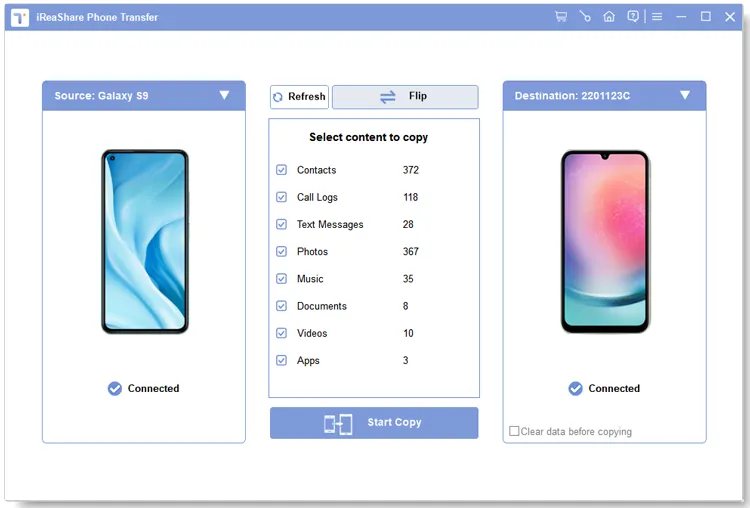
iReaShare Phone Transfer is a Windows and macOS tool built around one screen: source on the left, destination on the right, category checkboxes, a Start Copy button. It documents twelve data categories across all four migration directions, which is more than tools costing twice as much.
The list is unusually specific: contacts, call history, text messages, notes, photos, videos, music, user apps, documents, calendars, Safari bookmarks and books. "Call history" and "notes" are the two line items that separate it from the pack — most rivals stop at contacts, messages and media.
Vendor documentation, not our bench
We have not run iReaShare on our bench yet, so the table above is the vendor's documented coverage, not our measurement. Our testing method exists precisely because documented coverage and delivered coverage diverge: one rival reported a successful transfer while 340 contacts were missing. Until we have a run for this tool, treat the twelve categories as a claim with good documentation behind it.
The cheapest way into twelve categories
A desktop transfer utility with a wide compatibility floor: Android 6.0 and later, iOS 5.0 and later, with vendor claims of support through Android 17 and iOS 27 beta. Old hardware is less likely to be refused than with tools that only list current models.
Two behaviours are documented and worth knowing before you start: the target device is not overwritten (the tool merges), and the source device is treated as read-only during the transfer. Both are the right defaults for a one-way migration.
Twelve categories, four directions
| Direction | Documented coverage |
|---|---|
| Android → Android | Full twelve-category set, USB or Wi-Fi |
| Android → iPhone | Full set, subject to iOS write limits |
| iPhone → Android | Full set, subject to iOS read limits |
| iPhone → iPhone | Full set |
The honest caveat: "full set subject to platform limits" is doing real work in the cross-platform rows. iOS will not accept SMS databases or call logs from a third-party tool in every configuration, and no vendor can promise it universally. Where this tool differs from cheaper rivals is that it lists those categories rather than quietly omitting them.
Setup, month by month
Two cables, one computer, category selection. The Android-to-Android Wi-Fi mode removes the cables but not the computer: the desktop application still drives the wireless link. It is slower, and it is the first thing to fail on a congested network — treat Wi-Fi as a convenience, not the default.
On the Android side expect USB debugging and a permission prompt; on iOS, the "Trust This Computer" dialog. Neither is optional, and both are the usual cause of a stalled first attempt.
$19.95 monthly, $39.95 once
| Licence | Price | Devices |
|---|---|---|
| Monthly | $19.95 | 1 PC |
| Yearly | $29.95 | 1 PC |
| Lifetime | $39.95 (list $49.95) | 1 PC |
The monthly tier is the interesting one: for a single migration, $19.95 buys a full-featured tool without a subscription you might not use again. The risk is the same feature — these licences auto-renew, so a "one-off" purchase becomes a year of payments inside three months if you forget. Set a calendar reminder on the day you buy.
Prices are regionalised and the lifetime tier is frequently discounted. Check the vendor's store page on the day rather than a coupon site.
Buy it for a single migration
- One-off movers who want a full-featured tool for a single weekend and no permanent subscription.
- Android → Android brand switches where call logs and notes matter — very few tools document both.
- Households with older hardware, given the Android 6.0 floor.
- Buyers who need call history, which most competitors omit entirely.
Skip it if you move phones often
- Anyone who needs WhatsApp. It is a separate module here, sold alongside the transfer tool.
- Wireless-only households. The Wi-Fi mode is convenience-grade, not a replacement for a cable.
- Multi-phone families. Every tier is single-PC.
- Buyers who will not cancel a subscription. The monthly plan renews automatically.
What a monthly licence risks
Wi-Fi transfer drops halfway. The desktop app loses the phone when the network changes channels. Switch to USB for anything above a few gigabytes, and keep both phones on power.
Monthly licence renews unexpectedly. Cancel immediately after the first successful transfer, not at the end of the month. The licence stays valid for the paid period.
Call logs arrive without names. Android stores call logs against contact IDs; if contacts have not finished merging, the log shows numbers only. Run the contacts category first, then call logs.
App transfer arrives as installers. Apps move as APK files, not Play Store downloads, so the target phone may need "install unknown apps" permission for the transfer tool.
Notes missing on newer iPhones. Apple's note format changed with iOS 11. Verify the notes count on the target device rather than trusting the summary.
Against Coolmuster and MobileTrans
| iReaShare | Coolmuster | MobiKin | |
|---|---|---|---|
| Score | 8.4 | 9.1 | 8.3 |
| Entry price | $19.95 / month | $25.95 / year | $29.95 one-off |
| Lifetime | $39.95, 1 PC | $35.95, 1 PC | $29.95, 1 PC |
| Documented categories | 12, incl. call logs + notes | 8 | 8, incl. apps + documents |
| Wi-Fi transfer | Android → Android | No | No |
| Separate module | No | No |
Against Coolmuster, iReaShare documents more categories but costs more over three years and lacks the local-only privacy framing. Against MobiKin, it is wider on data types and weaker on app migration. All sixteen tools are in the comparison table.
Where the price advantage ends
- No WhatsApp in this product — a separate purchase.
- Wi-Fi mode is the weak link.
- Interface is plain and slightly dated.
- Documentation is broad but shallow on partial-failure behaviour.
- Single-PC licensing across every tier.
Verdict
The best coverage-per-dollar in the category, and the only tool here with a genuinely useful monthly tier. The missing WhatsApp module is why it sits third rather than first: for many buyers that gap is the whole purchase.
8.4/10 — widest documented data list at this price, one obvious gap.
FAQ
Is the monthly licence auto-renewing?
Yes. Cancel before the renewal date; the licence is not pro-rated.
Does Wi-Fi mode work between iPhone and Android?
The wireless option is documented for Android to Android. Cross-platform moves use USB.
Can it transfer to a phone already in use?
Yes — it merges rather than overwriting, so check for duplicates afterwards.
Does it need root?
No. It uses standard USB access and the iOS backup channel.
Where is the WhatsApp transfer?
Sold as a separate module. See our WhatsApp guide for the free official route first.