Affiliate links are used below. Our score is set before any commercial relationship is considered.
MobiKin Transfer for Mobile is a Windows and macOS desktop tool that leans toward Android: installed apps, documents, photos, videos, music, contacts, messages and call logs move from one phone to another with one click. Cross-platform support exists, but it reads as a bonus feature rather than the core product.
The pitch is simplicity. There is no category matrix to negotiate if you do not want one: connect both phones and press the button.
Documentation only: what the vendor commits to
Documentation-based review: we have not run this build on our bench. The vendor's category list is narrower and more specific than its marketing ("phone to phone transfer"), which is usually a good sign — but it is still a claim. See the test log for what claims look like after a measured run.
The one-click app mover
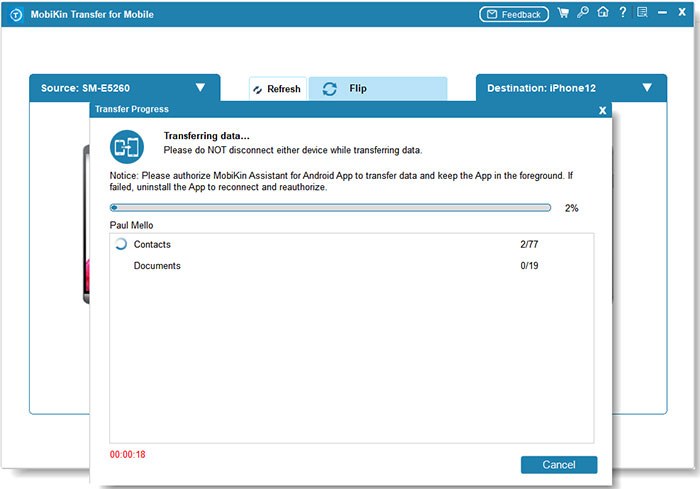
A one-click cloner. The tool detects both devices and assigns source and destination automatically, which removes the most common user error in this category — connecting them the wrong way round half an hour into a transfer.
The vendor states compatibility up to Android 17 and iOS 27 with the current build, and supports Windows 11 through 7. A macOS build of the same product exists at a different price point.
Apps and documents, not just contacts
| Direction | Documented coverage |
|---|---|
| Android → Android | Contacts, SMS, call logs, photos, videos, music, apps, documents |
| Android → iPhone | Core set per vendor documentation |
| iPhone → Android | Core set |
| iPhone → iPhone | Core set |
The Android-to-Android row is the reason to consider this product at all: apps and documents are the two categories most tools quietly skip, and the two that make a new phone feel like the old one. Music libraries and document folders usually require a computer and a manual drag otherwise.
One click, two phones
Two cables and a computer. Once both devices are detected, a one-click mode transfers everything and a selective mode lets you untick categories. Expect USB debugging on Android and a trust prompt on iOS.
App transfer is the fiddly part. Apps arrive as APK files rather than Play Store downloads, so the target phone may need to allow installation from unknown sources, and the apps arrive logged out. If you are moving 40 apps, budget time to sign back into the five that matter.
Licence and device limits
| Licence | Price | Devices |
|---|---|---|
| Standard (Windows) | $29.95, list $49.95 | 1 PC |
| Yearly | auto-renewing | 1 PC |
| Mac build | separately priced | 1 PC |
The list price is the number to keep in mind when comparing: at $49.95 this is the most expensive single-PC licence in our comparison. At $29.95 it is fairly priced. If the discount ends, the value argument weakens considerably.
Yearly licences renew automatically, with no prominent reminder in the purchase flow.
Buy it if apps are the hard part
- Android → Android movers who want apps and documents, not just contacts and photos.
- Non-technical buyers who want one button and no decisions.
- People migrating a work phone where a document folder matters more than chat history.
- Buyers who dislike subscriptions — the standard tier is a one-off purchase.
Skip it if you need SMS
- Android → iPhone movers. The cross-platform documentation is thin; MobileTrans documents that direction properly.
- Anyone who needs WhatsApp. Not supported here.
- Families with several phones. Single-PC licence, no family tier.
- Buyers at list price. At $49.95 there are cheaper and better-documented options.
Where one-click runs out
Apps install but do not open. Some APKs require Play Services or a specific architecture. Reinstall the failing app from the Play Store instead of forcing the APK.
Document transfer skips hidden folders. Files inside app-private storage are not accessible without root. Copy those manually from the app's own export function.
One-click mode overwhelms the target. Transferring a 60 GB library in one pass can fill the new phone mid-run. Free up at least the source's used space plus 20% before starting.
Transfer stops at "preparing devices". Usually a cable or a sleeping screen. Use the cable that shipped with the phone and set the screen timeout to 30 minutes.
Duplicates after the merge. Expected: the tool does not wipe the target first. Merge in the contacts app and remove the second sync source.
Against MobileTrans and Dr.Fone
| MobiKin | iReaShare | Coolmuster | |
|---|---|---|---|
| Score | 8.3 | 8.4 | 9.1 |
| Price | $29.95 (list $49.95) | $19.95 / month | $25.95 / year |
| Lifetime | — | $39.95, 1 PC | $35.95, 1 PC |
| Apps + documents | Yes | Apps yes, documents yes | Apps yes, documents no |
| Call logs + notes | Call logs yes | Both | Call logs yes |
| No | Separate module | No |
Against iReaShare it is better at app migration and worse on documented breadth. Against Coolmuster it wins on documents and loses on price and on the four-direction clarity. See the full comparison.
Narrow category list
- List price is high for a single PC.
- Yearly licences auto-renew quietly.
- Documentation is thin on partial failures.
- No WhatsApp, no family licence.
- Cross-platform rows are under-documented.
Verdict
A solid, unfussy cloner that earns its place when the job is Android to Android with apps and documents in scope. It is fourth rather than first because its cross-platform story is less documented than its Android story, and its list price is steep for one machine.
8.3/10 — the best tool here for app and document migration between Android phones.
FAQ
Do transferred apps keep their data?
No. The installer moves; private app data does not unless the app restores from its own cloud.
Does it work with Android 17?
The vendor states compatibility up to Android 17 and iOS 27 with the current build. Confirm on the compatibility list if you are on a very new device.
Can I move the licence to a new computer?
Single-PC licence: deactivate the old installation first.
Is there a Mac version?
Yes, priced separately from the Windows build.