Affiliate links are used below. Our score is set before any commercial relationship is considered.
Dr.Fone – Phone Transfer is one module inside the larger Dr.Fone toolkit, sold separately for Windows and for macOS. Same vendor as MobileTrans, different packaging: here the transfer feature arrives inside a suite rather than as a standalone utility.
If you already use Dr.Fone for iPhone repairs or data recovery, the module is a sensible addition. If you only want to move a phone, you are buying a toolkit to use one drawer of it — and the Mac and Windows licences are separate purchases, so it pays to know which one you need before you pay.
The Windows sibling we did measure
Documentation-based: we have not timed this Mac build on our bench. Its Windows sibling, MobileTrans, was measured — 21 min 12 s for nine categories, with a contact shortfall we recorded in the test log. The two products share a vendor and a module design, so that result is the relevant caution: verify contact counts afterwards rather than trusting the summary.
One module inside a toolkit
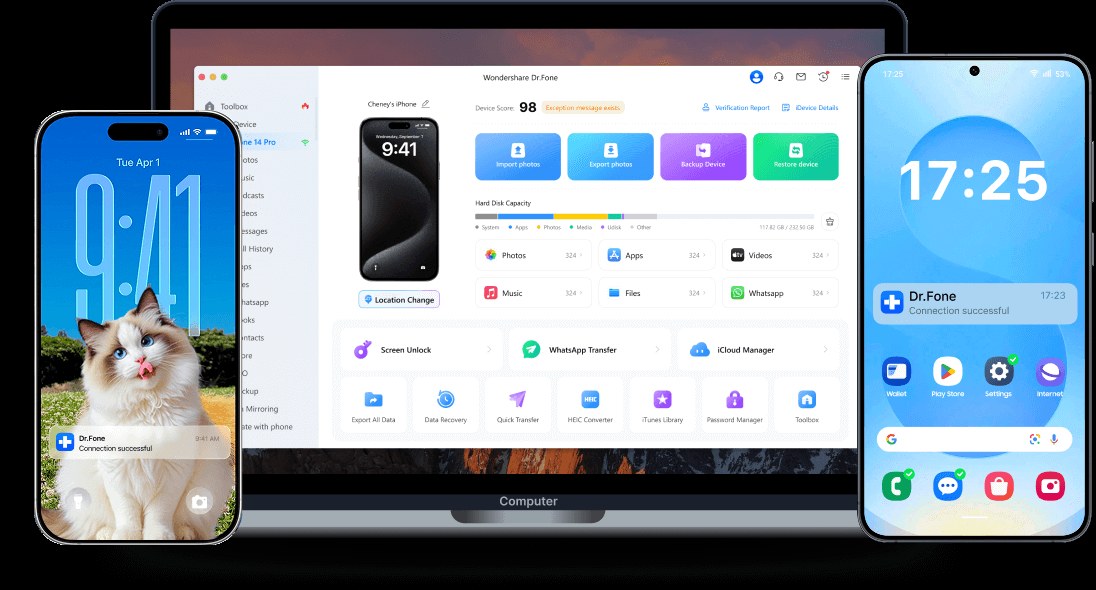
A desktop application, Windows or macOS, with a module grid: phone transfer, WhatsApp transfer, screen unlock, data recovery, iOS repair, backup and restore. The transfer module moves contacts, messages, call logs, photos, videos, music, apps and app data across iOS and Android in all four directions.
The Mac build is native rather than a Windows port wrapped in a Mac shell, which matters in this category: several competitors ship Mac versions that inherit Windows-era driver assumptions. The Windows build is the mainstream one, and it is the platform where the vendor's own MobileTrans has been measured.
Coverage that depends on the module
| Direction | Documented coverage |
|---|---|
| Android → Android | Contacts, SMS, call logs, photos, videos, music, apps, app data |
| Android → iPhone | Same set, subject to iOS write limits |
| iPhone → Android | Same set |
| iPhone → iPhone | Same set, plus WhatsApp through the module |
Setup, and the toolkit upsell
On Windows: install, connect both phones by USB, accept USB debugging on Android and the trust prompt on iOS, then select categories. Apple Mobile Device drivers are required if iTunes is not installed — their absence is the usual first-run failure.
On macOS: the same flow, plus a one-time security approval for the system extension on Apple silicon. The advantage there is mundane and real — no Windows VM or Parallels licence just to move an address book.
Toolkit pricing, not module pricing
| Licence | Price | Scope |
|---|---|---|
| Monthly | from $29.95 | Phone Transfer module |
| Perpetual full toolkit | $115.95 (Mac) | all Dr.Fone modules, 1–5 devices, 2 Macs |
| Perpetual phone transfer | regional pricing | module only |
The refund window is 7 days on both platforms. Regional pricing is significant — the same module is listed at €19.99 a month in some stores and $29.95 in others.
The permanent toolkit at $115.95 is the tier the store pushes hardest. Worth it only if you also want iOS repair or data recovery; for transfer alone it is three times the price of a lifetime licence elsewhere.
Buy it if you want the bundle
- Existing Dr.Fone users adding transfer to a toolkit they already own.
- Mac-only households that want a native four-direction transfer tool.
- Android → iPhone movers who also need a WhatsApp module in the same app.
- Buyers who want one vendor for repair, recovery and migration.
Skip it if you want one job done
- Price-first buyers. A $35.95 lifetime licence elsewhere covers the same job.
- Anyone who only needs Android to Android. Cheaper tools are complete in that direction.
- Buyers who need more than 7 days to test. The refund window is short.
- Windows users. Dr.Fone's Windows phone transfer is sold separately; do not buy the Mac tier by mistake.
Failure points and fixes
The module is greyed out. Dr.Fone gates modules by licence tier. If Phone Transfer is locked, you own a different SKU — check the licence panel before assuming a bug.
Mac blocks the helper process. System Settings → Privacy & Security → allow the kernel extension, then reconnect both phones.
Contacts arrive incomplete. The vendor's Windows module lost contacts on our bench. Export a vCard from both phones first so the missing set can be re-imported.
WhatsApp transfer fails after an iOS update. The module depends on reading the iOS backup container; an encrypted backup needs the password. Disable encryption temporarily, or supply the password when prompted.
Two Macs, one licence. The perpetual tier covers two Macs; the monthly tier generally covers one. Deactivate before switching machines.
Against MobileTrans and Coolmuster
| Dr.Fone (Mac) | MobileTrans | Coolmuster | |
|---|---|---|---|
| Score | 8.1 | 8.7 | 9.1 |
| Platform | macOS | Windows, macOS | Windows, macOS |
| Entry price | from $29.95/mo | $29.95/yr, 5 phones | $25.95/yr, 1 PC |
| Perpetual | $115.95 toolkit | $39.95, 5 phones | $35.95, 1 PC |
| Yes, module | Yes | No | |
| Four directions | Yes | Yes | Android→iPhone limited |
Against MobileTrans, the Mac build costs more for the same engine because it arrives inside a toolkit. Against Coolmuster, it buys WhatsApp and app data at roughly three times the lifetime price.
The bundle tax
- Toolkit pricing for a single feature.
- 7-day refund window.
- Monthly tier is the default, which suits the vendor more than the buyer.
- Contact-transfer reliability is unverified on this platform.
- Mac and Windows licences are separate purchases.
Verdict
A capable Mac transfer tool trapped in a bundle. If you want one application for repairs, recovery and migration on a Mac, the maths works. If you want to move a phone once, the same vendor sells a cheaper Windows-and-Mac tool and everyone else sells a cheaper lifetime licence.
8.1/10 — good engine, expensive wrapper.
FAQ
Is this the same as MobileTrans?
Same vendor, same module design, different packaging and platform. MobileTrans is the standalone product; Dr.Fone is the suite.
Does the Mac licence work on Windows?
No. Platform licences are separate.
Can it transfer WhatsApp from Android to iPhone?
Yes, through the WhatsApp module included in the toolkit tier.
How long is the refund window?
7 days, shorter than most of this category.