Affiliate links are used below. Our score is set before any commercial relationship is considered.
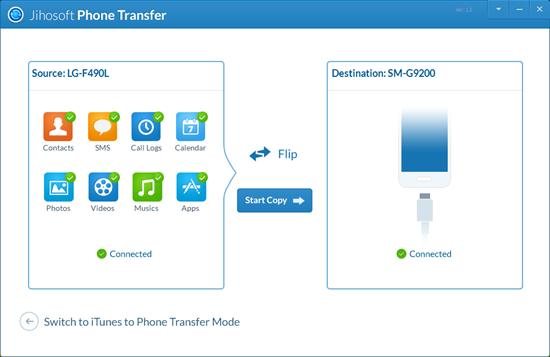
Jihosoft Phone Transfer is a Windows utility that copies seven categories between an iPhone and an Android phone over USB: contacts, SMS, call logs, calendar, photos, videos and music. On paper that is a respectable list for a mid-field tool. On our bench it took 36 minutes and reported counts that did not survive verification.
What we measured
| Measure | Result |
|---|---|
| Version | 3.1.8 |
| Categories offered | 7, including call logs |
| Run time | 36 min 17 s |
| Photos detected | 539 — did not match the device |
| Videos detected | 55 — did not match the device |
| Contacts actually transferred | 507 |
| Weak point | Video transfer was the slowest category |
The contact result is the good news: 507 arrived. The problem is reconciliation — if the tool's own photo and video counts disagree with the device, you cannot use its summary to decide whether the transfer completed. You have to count on the target phone.
Full bench summary for all eight tools we ran: our testing method.
A seven-category desktop tool
A classic one-screen transfer tool: source on the left, destination on the right, category checkboxes, a Start button. Supports iOS ↔ Android in both directions and partial selection per category. There is no app-data support and no WhatsApp support; the sibling product, Jihosoft Android Manager, has no transfer feature at all despite the family name.
Setup on our bench machine
Two data-capable cables, USB debugging on Android, a trust prompt on iOS. The tool detects both devices without drama — connection stability was not a problem in our run, which is more than several rivals can say.
What the licence covers
Pricing is regionalised and heavily discounted, and the product page does not publish a refund window. Treat that as a gap: a tool that cannot be trialled and does not state a refund term is a commitment, not a purchase. Check the vendor store on the day and pay with a card that offers chargeback protection.
Buy it if you need call logs
- Users who need call logs and calendar alongside contacts — a shorter list than it sounds, since many rivals skip both.
- People who want a straightforward cable transfer with no cloud step.
- Buyers who will verify counts themselves and re-run a category if it falls short.
Skip it if counts must match
- Anyone in a hurry. 36 minutes is the slowest run we recorded.
- Android → iPhone movers who need app data or chats. Neither is supported.
- Buyers who want a documented refund policy.
- Anyone who needs to know the tool's counts are accurate — they were not, in our run.
Where the counts diverged
Counts do not match the phone. Record your photo and video totals before starting, then compare on the target. If the numbers diverge, re-run the category alone rather than the whole transfer.
Video transfer stalls. Large video files dominate the run time. Transfer videos last, separately, and keep both screens awake — Android suspends USB data when the screen sleeps.
Contacts land in duplicate. The tool merges into an existing phone. Merge in the contacts app afterwards, then disable the second sync source.
Nothing happens after "connected". Use the cable that shipped with the phone; charge-only cables are the usual cause.
Against MobileTrans and FonePaw
| Jihosoft | Coolmuster | MobileTrans | |
|---|---|---|---|
| Score | 6.9 | 9.1 | 8.7 |
| Categories | 7, incl. call logs | 8 in Android → Android | 9, incl. app data |
| Measured run | 36m 17s | not run | 21m 12s |
| No | No | Yes | |
| Refund policy | Not published | 30 days | 7 days |
It beats Coolmuster on documented call-log coverage for cross-platform moves and loses on speed, app data and refund clarity.
36 minutes, and the mismatch
- Slowest measured run in our group.
- Detection counts unreliable.
- No app data, no WhatsApp.
- No published refund policy.
- Interface feels a decade old.
What users report
Neither Google Play nor the App Store lists this desktop tool, and we found no third-party review base solid enough to weigh against our own numbers. Curated testimonials are not evidence on this site; how we test says what we accept instead. The verdict rests on our own timed run.
Verdict
A mid-field tool with one real strength — call logs and calendar in a cross-platform move — and one disqualifying weakness: it is slow, and its counts cannot be trusted without checking. For a one-off migration where completeness matters, pay the extra for a faster, better-documented tool.
6.9/10 — works, slowly, and asks you to double-check everything.
FAQ
Does it transfer WhatsApp?
No. Use a dedicated chat-migration product; see the WhatsApp tools page.
Is it safe?
It runs locally over USB and does not require an account. Keep a backup of the old phone regardless.
Does it need root?
No.
Why did the detected photo count not match my phone?
The tool counted a different set than the device reported — possibly cached thumbnails. Verify on the target device.